
Guardian Feast: Daily Recipes
Guardian News & Media LtdFood & Drink
4.227.00 Reviews
- Version
- 1.0.0.698
- Installs
- 100.00K
- Age Rating
- Everyone
Screenshots




Our Review of Guardian Feast: Daily Recipes
 Analysis by Appyee
When dinner has to work for more than one person, choosing what to cook can become its own chore. I find a recipe app most useful when it helps turn “What sounds good?” into a plan that fits the people sharing the meal, the time available, and what is already in the kitchen. Guardian Feast: Daily Recipes is aimed at that everyday decision: it offers cooking inspiration from Guardian News & Media Ltd, with recipes as the main event rather than a general food-shopping or restaurant-discovery experience.
That focus makes it a natural fit for households that like to cook at home and want fresh ideas without starting from a blank search box. It is free to download, rated for Everyone, and has an average rating of 4.1 from over 700 ratings. There are optional in-app purchases, so I would check the purchase details before treating every part of the experience as included. The app has passed 100,000 installs, which suggests it has found an audience, though popularity alone does not tell me whether its recipes match a particular household’s tastes.
One kitchen, several appetites
A shared-use scenario is where the idea becomes practical. Imagine getting home late, with one person hoping for something filling and another wanting a lighter meal. Rather than opening several food blogs and comparing unrelated recipes, I would use the app to browse for a dish that feels manageable, then talk through the choice with whoever is cooking or eating. A shared screen can make that conversation easier: everyone can react to the same recipe and settle on a direction before ingredients are bought.
That does not mean a recipe app automatically coordinates a household. The useful part is having a common source of inspiration; the people using it still need to agree on preferences, portions, and who is doing which task. I would treat the recipe as a starting point, not as a household plan that magically accounts for everyone’s needs. For a couple or a small household that enjoys deciding together, that light-touch approach can be enough. For a larger family with very different diets, more deliberate planning may be necessary.
Setting expectations before cooking
On a shared phone or tablet, I would keep expectations simple: one person can browse, another can read out the steps, and the cook can check the ingredients as needed. That division avoids passing a device around with messy hands and gives everyone a role without assuming the app has household profiles or special family controls. If several people use the same device, it is worth agreeing whose saved choices or account activity they are looking at before making changes.
I also would not assume that one person’s preferences represent everyone else’s. A recipe that looks appealing to the person browsing might not suit another eater, and a listed ingredient can matter more than the headline suggests. Before committing, I would read the full ingredient list and instructions, then make any substitutions deliberately. That small pause is especially helpful when cooking for someone with allergies, food restrictions, or a strong dislike of a particular ingredient.
Making a decision together
For a weeknight, the most useful workflow is often to narrow the options before anyone is hungry. I would browse when there is a spare moment, choose a couple of promising dishes, and then check which one best fits the evening’s time and ingredients. If a meal planner or shopping list is available in the version being used, those tools can help turn a choice into a practical next step; I would still review the list rather than assume it has caught every pantry item or household preference.
That is also where this kind of app differs from a quick web search. Search results can be excellent when I know exactly what to make or need to use one particular ingredient, but they can scatter me across pages with different formats and levels of detail. A dedicated recipe app can make browsing feel more cohesive and encourage discovery. In return, I have to accept its own way of organizing food and avoid expecting the breadth of the entire web. If I need a very specific dietary filter or a tightly controlled meal plan, a specialist service may be a better fit.
Age, trust, and kitchen judgement
The Everyone content rating makes the app broadly suitable for general audiences, but that is not the same as saying every recipe is appropriate for every cook or eater. Children can enjoy choosing a dish with an adult, while an adult should handle hot pans, sharp knives, and any other risky steps. I would also read instructions before handing a recipe to a young or inexperienced cook; the age label is about content, not a guarantee that a cooking task is safe to do alone.
Trust in a recipe comes from checking whether it suits the situation, not just from seeing it on a screen. I would pay attention to ingredient quantities, timing, and any technique that is new to me, and use ordinary food-safety judgement throughout. If a dish depends on equipment I do not own or ingredients I cannot easily find, I would choose another recipe rather than force the plan. That is a modest but important distinction: inspiration is valuable, yet the cook remains responsible for adapting it sensibly.
First Impressions and User Interface
When I first launched Guardian Feast: Daily Recipes, the interface struck me as pretty sleek and straightforward. It’s got this clean, modern design that doesn’t overwhelm you with too many colors or flashy graphics. Instead, it focuses on what truly matters – the recipes. Navigating through the app is a breeze, thanks to its intuitive layout.
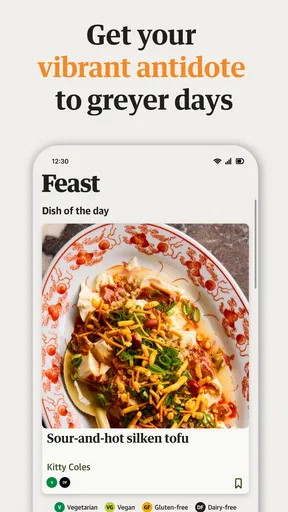
Upon opening, you’re greeted with a daily recipe, which is a nice touch. It feels a bit like a surprise gift every day. The app’s homepage is organized into various sections like ‘New Recipes’, ‘Trending’, and ‘Favorites’. It’s easy to get lost in the sea of deliciousness, but the search feature ensures you can find exactly what you’re craving.
Recipes Galore
Now, onto the heart of the app – the recipes. With Guardian Feast, you’re not just getting any recipes; you’re getting the cream of the crop. The app offers a wide range of cuisines, from traditional classics to modern twists. Whether you’re in the mood for a simple pasta or an exotic dish, there’s something for everyone.
Each recipe comes with a detailed ingredient list and step-by-step instructions. What I really appreciated was the inclusion of prep and cook times, nutritional info, and difficulty levels. It’s perfect for both newbie cooks and seasoned chefs. Plus, there are user-generated reviews and ratings, which provide additional insights into each recipe.
Special Features
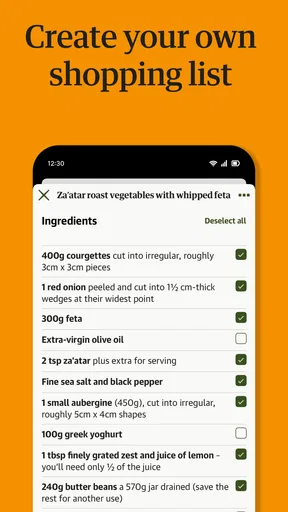
One of the standout features of the app is its meal planner. You can easily plan your meals for the week and even generate a shopping list based on your selections. This feature is a game-changer for those of us who want to stay organized and avoid those last-minute grocery runs.
Another highlight is the community aspect. Users can upload their own recipes and share tips, creating a vibrant community of food enthusiasts. It's like having an endless potluck where everyone brings their A-game. I found myself swapping tips with fellow users and even tweaking recipes based on their suggestions.
Learning and Inspiration
The app isn’t just about following recipes; it’s about learning and experimenting. There are cooking tutorials and video guides which are super helpful, especially if you’re trying out a new technique. I tried my hand at making homemade pasta, and the step-by-step video was a lifesaver.
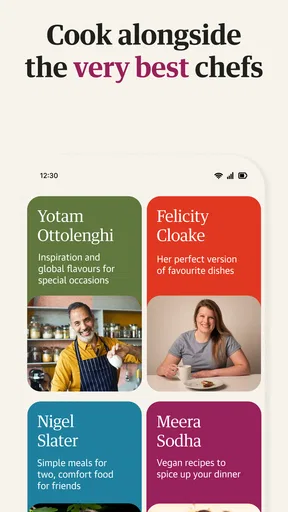
Moreover, the app curates articles and cooking tips from professional chefs. It’s like having a mini cooking class at your fingertips. Whether you’re looking to perfect your knife skills or master the art of grilling, there’s plenty of content to up your culinary game.
Overall Experience
After spending some quality time with Guardian Feast: Daily Recipes, I can confidently say it’s a must-have for any food lover. It’s more than just a recipe app; it’s a comprehensive culinary tool that inspires and educates. The seamless user experience, coupled with a diverse array of recipes, makes it a delightful addition to any kitchen.
Whether you’re a busy parent needing quick dinner ideas or a passionate foodie eager to explore new cuisines, this app has got you covered. So, if you’re ready to embark on a delicious journey, give Guardian Feast: Daily Recipes a try. Trust me, your taste buds will thank you.
Choosing it for your household
My strongest recommendation is for people who want a reliable source of cooking ideas and enjoy browsing before settling on dinner. It can also suit a household where one person does most of the cooking but likes to invite others into the decision. The daily recipe gives browsing a gentle prompt, while search is more useful when the meal needs to match a particular craving. Those are different ways to use the same app: one encourages discovery, the other helps narrow a decision.
I would be more cautious if the household relies on strict dietary planning, precise nutrition targets, or recipes tailored to a narrow set of ingredients. The available recipe details can help me assess a dish, but I would not use a general-purpose recipe app as a substitute for specialist advice or careful label checking. Likewise, someone who mainly wants automatic pantry tracking, grocery delivery, or a fully coordinated family calendar may prefer a tool built specifically around those tasks.
The app is free, but optional purchases range from a few dollars to more substantial in-app items. That makes it sensible to explore the free experience first and decide whether any paid option solves a real need for you. Its current version is 1.0.0.683, and it requires Android 8.0 or later. Those details matter if you are choosing an older household device or deciding whether to install it across devices; I would check compatibility on each one rather than assume every phone or tablet can run it.
For coordination, I would keep the process deliberately low-tech: agree on a meal, check the recipe together, and make a separate note of anything that needs buying. A planner or generated list can reduce memory work, but it should not be treated as an unquestionable inventory. Before leaving for the shop, compare the list with what is already at home and confirm quantities. This simple double-check can prevent duplicate purchases and is more dependable than assuming a recipe tool knows what is in your cupboards.
My household verdict is that this is best as a shared source of inspiration, not as the household’s entire food-management system. It can make the “what should we cook?” conversation more enjoyable and help a willing cook move from idea to instructions. The trade-off is that people still have to coordinate preferences, shopping, and safe preparation themselves. If that is the kind of help you want, I think it earns a place on a kitchen device; if you need rigid dietary controls or automation first, I would look elsewhere.
Verdict
Strengths of Guardian Feast: Daily Recipes
- Easy-to-follow recipes for any skill level.
- Wide variety of international cuisines.
- Daily meal planner feature included.
- Offline access to saved recipes.
- Nutritional information for each dish.
Limitations of Guardian Feast: Daily Recipes
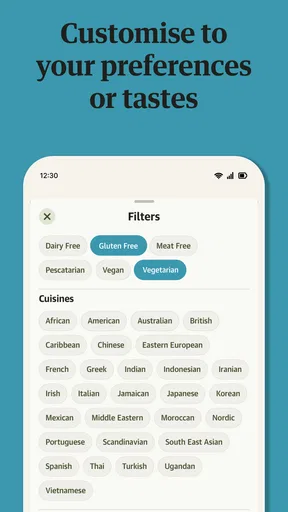
- Limited customization for dietary restrictions.
- Occasional ads can interrupt browsing.
- Requires account for full features.
- Some recipes lack detailed instructions.
- No video tutorials available.
Other Releases by Guardian News & Media Ltd
View All
The Guardian - US & World News
News & Magazines4.5
Similar Picks in This Category
View All
Rappi: Food Delivery, Grocery
Rappi, Inc - Delivery3.5

McDonald’s: Cupons e Delivery
Arcos Dorados4.3

Swiggy: Food Instamart Dineout
Swiggy4.7

Blinkit: Groceries & more
Blinkit4.8

foodpanda: food & groceries
Foodpanda GmbH a subsidiary of Delivery Hero SE4.0

Zomato: Food Delivery & Dining
Zomato4.7
Frequently Asked Questions
What platforms is Guardian Feast: Daily Recipes available on?
Guardian Feast: Daily Recipes is available on both Android and iOS platforms. You can easily download it from the Google Play Store or the Apple App Store. Ensure your device meets the necessary system requirements for a smooth experience while exploring the app's rich recipe collection.
Does Guardian Feast: Daily Recipes require an internet connection?
Yes, Guardian Feast: Daily Recipes requires an internet connection to access its extensive recipe database. This connectivity ensures you receive the latest updates, including new recipes and user reviews. However, you can save your favorite recipes to view offline when you don’t have internet access.
Are there any subscription fees or in-app purchases?
The app is free to download and offers a wide range of recipes at no cost. However, it does include optional in-app purchases for premium features like ad-free browsing and exclusive recipe collections. These purchases enhance your experience but are not necessary to enjoy the app’s core features.
How user-friendly is Guardian Feast: Daily Recipes for beginners?
Guardian Feast: Daily Recipes is designed with a user-friendly interface, making it suitable for beginners and experienced cooks alike. It offers step-by-step guides, ingredient lists, and cooking tips, ensuring everyone can create delicious meals with ease. The intuitive search function also helps users find recipes quickly.
Can I contribute my own recipes to Guardian Feast: Daily Recipes?
Yes, Guardian Feast: Daily Recipes encourages user contributions, allowing you to share your own recipes with the community. Simply create an account, and you can upload your recipes, complete with images and cooking instructions. This feature fosters a communal spirit and enriches the app’s recipe offerings.
